Smart Messages
- 4.1
- Rating
- 1.00M
- Installs
- Free
- Price

 Analysis by App-foxy
Smart Messages is a communication app built around one clear idea: making ordinary texting feel more capable without asking you to abandon the familiar SMS conversation. I spent time using it as a practical messaging tool, and my overall impression is that its value depends less on flashy extras and more on whether your daily contacts can benefit from a richer texting experience. When that condition is met, it can make routine conversations feel more modern. When it is not, the app can feel like an additional layer over a system that already works.
The app comes from SMS/MMS/RCS and sits in the communication category. It is free to install, suitable for Everyone, and supports devices running Android 6.0 or later. Its current version is 2.1.8, while optional purchases range from $0.99 to $10.99 per item. The service has passed one million installs, with an average rating of 4.1 from roughly twenty-four thousand ratings and about two thousand reviews. Those figures suggest a product with a real audience, although they also hint that the experience may vary depending on phone, carrier, and the messaging habits of the people you contact.
What Smart Messages changes about everyday texting
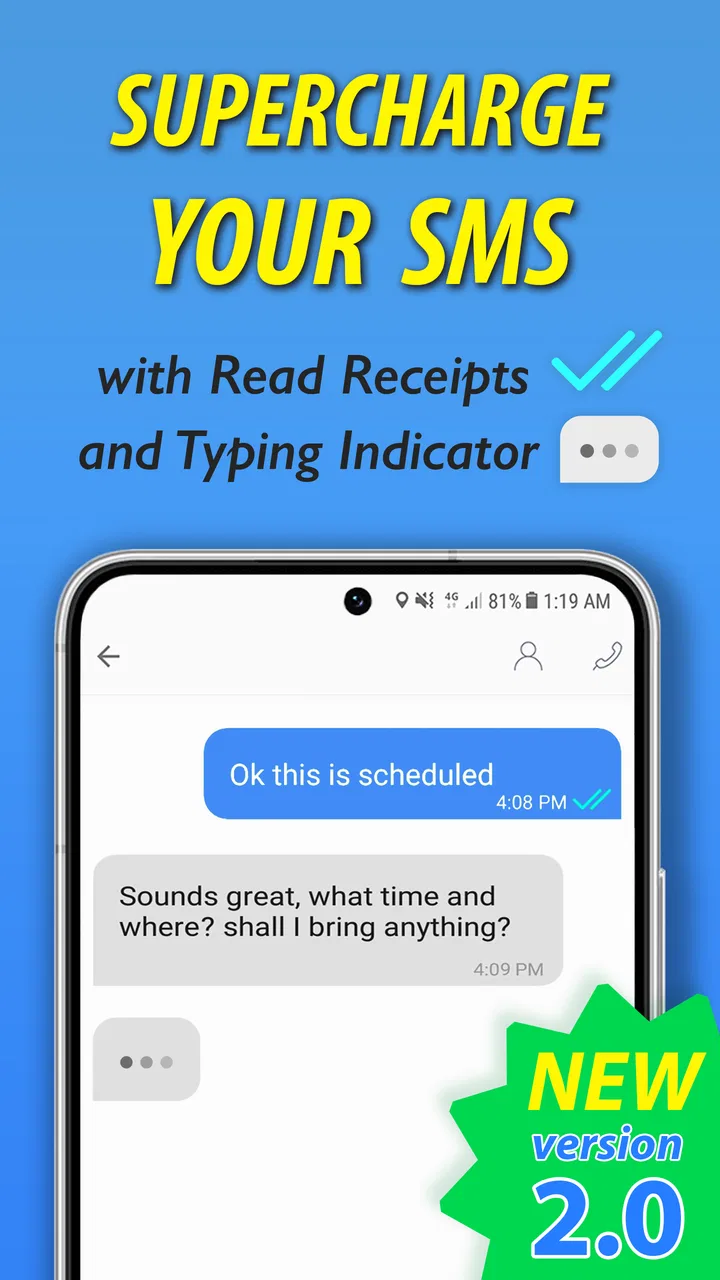
The central capability is its attempt to upgrade SMS through next-generation texting. That sounds simple, but the practical difference is important: SMS is dependable for short, plain messages, while newer messaging standards can make conversations feel closer to modern chat apps. The benefit is not that every message suddenly becomes a full social platform. The benefit is that the conversation can be more comfortable when richer messaging is available.
You May Also Like

 Blood Strike: 2.5 Anniversary
Blood Strike’s Loadouts Turn Every Drop Into a Tactical Gamble
A close look at Blood Strike’s custom loadouts: how fast access to signature weapons reshapes its battle royale rhythm, rewards preparation, and narrows the gap between fights.

 Pandora - Music & Podcasts
Pandora’s Music Is Easy to Start, but Harder to Recover
Pandora’s strength is its low-effort path from a seed to a station. Its weak spot is how much confidence it asks you to place in connection, setup, and quiet recovery.

 8 Ball Pool
 Is Built on Rivalries, Rematches, and Routine
A close look at the rivalries, rematches, shared routines, and unanswered safety questions that turn a quick pool match into a persistent mobile community.

 Samsung Music
’s Quiet Strength Is Playing What You Already Own
Its reach comes less from spectacle than from dependable access to a personal library. That simplicity is both the app’s strongest retention engine and its ceiling.

 AccuWeather: Weather Radar
AccuWeather Review: A Quick, Clear Forecast for Everyday Decisions
For everyday plans, the best forecast is the one you can understand quickly. AccuWeather makes rain timing, radar, and local conditions easy to act on, with a few trade-offs.

 Hill Climb Racing
Why Hill Climb Racing Still Turns Crashes Into One More Run
A tiny car, a bumpy hill and one more upgrade: Hill Climb Racing keeps resurfacing because its simple chaos makes every near-miss feel personal.
More From Our News Desk



I found this most useful when a conversation moved beyond a quick sentence. A basic text is fine for “I’m outside” or “Can you pick up bread?” But once the exchange includes several replies, shared media, or a longer back-and-forth, the limitations of traditional SMS become more noticeable. Smart Messages is aimed at that middle ground: people who still rely on phone numbers and texting, but want more than the most basic version of the format.
The real strength is continuity. You do not need to convince every contact to join a separate social network or create a new account just to start a conversation. That makes the app easier to consider than a service that only works well when everyone in your circle installs the same platform. The catch is that the richer experience is not entirely controlled by the app itself. The other person’s phone, messaging setup, and network support all influence what happens.
This is why I would not describe Smart Messages as a universal replacement for every chat service. It is better understood as an attempt to improve the texting route you already use. If your family, coworkers, or close friends communicate mainly through phone numbers, that focus can be useful. If your important conversations already live inside a dedicated chat platform, switching may offer little practical reward.
The capability matters most in mixed-device conversations
One of the more realistic reasons to try it is a contact list made up of people with different devices and different habits. Some may prefer a dedicated messenger, others may avoid new accounts, and a few may only answer standard texts. Smart Messages gives you a way to keep phone-number conversations central instead of maintaining several unrelated apps just to reach everyone.
That convenience has a limit. A richer texting experience cannot erase compatibility differences. A contact who receives only basic SMS will not suddenly gain every advantage available to someone using a compatible next-generation messaging setup. I consider this a key expectation to set before installing it: the app can improve your side of the conversation, but it cannot guarantee the same experience at both ends.
For that reason, I would test it with one or two regular contacts before making it the main tool for all communication. Choose people who reply often and who are likely to notice the difference. That small trial tells you more than a long feature list because it reveals whether your actual conversations benefit from the upgrade.
How it feels during a normal conversation
In daily use, the important question is not whether the interface looks more modern. It is whether sending and receiving messages becomes less awkward. Smart Messages makes the most sense when it reduces the need to jump between a plain texting app and another service whenever a conversation becomes more involved.
Imagine a weekday evening when I am coordinating dinner with two relatives. One person is already on the way, another needs the address again, and I have to clarify the time after a delayed bus. This is not an elaborate group project, but it is exactly the kind of exchange where plain texting can become messy. A more capable messaging layer helps keep the conversation together instead of turning every adjustment into a separate call or app switch.
The same applies to a small work-related exchange that does not justify moving into a formal collaboration tool. A team member may need a quick update, a reminder, or a piece of information while everyone is already using their phone numbers. Smart Messages is appealing here because it keeps the interaction lightweight. I would still avoid using any messaging app as the sole place for important records, but for quick coordination it can be a sensible middle option.
There is also a useful distinction between personal convenience and guaranteed delivery. People often assume that a newer messaging experience automatically means every message will behave like an internet chat. That assumption can lead to confusion when a contact is offline, unsupported, or using a different setup. I recommend treating it as a flexible texting tool rather than assuming every exchange has identical capabilities.
A practical setup approach
My advice is to begin with a small, deliberate test. Install the app, use it with a frequent contact, and pay attention to whether the conversation remains comfortable when it includes more than short text. Try a one-to-one exchange first, then a small group conversation if that is part of your normal routine. This helps separate the app’s usefulness from the excitement of simply trying something new.
It is also worth deciding which conversations should remain elsewhere. I would keep highly sensitive discussions in a service whose security model and controls you already understand, rather than assuming that a messaging upgrade automatically provides every privacy feature you might want. For ordinary coordination, family updates, and casual communication, the app may be enough. For confidential work or personal information, I would choose based on clearly understood protections, not convenience alone.
Another practical habit is to keep a fallback in mind. If a contact cannot use the richer experience, the conversation may need to continue through standard texting or another messenger. That is not necessarily a failure, but it means Smart Messages works best as part of a communication routine rather than as the only channel you maintain.
Where the app saves effort
The biggest time saving comes from reducing app-hopping. If I can contact someone through the number already stored in my phone and still handle a more substantial exchange, I spend less time checking which service that person prefers. This matters especially for people who communicate with a broad mix of contacts rather than a close group using one shared platform.
The app can also make texting feel less disposable. Standard SMS is excellent for speed, but longer conversations can become difficult to follow, particularly when several people respond at different times. A more modern conversation flow can make the thread easier to use for planning, reminders, and ongoing updates. That is a modest improvement, but it is the kind of improvement I notice repeatedly rather than only during a demonstration.
At the same time, I would not install it expecting a complete replacement for every feature found in large chat ecosystems. Those services often have mature tools for communities, media organization, identity management, and cross-platform routines. Smart Messages has a narrower purpose, and that narrowness is both its appeal and its limitation.
The best scenario for Smart Messages
The strongest fit is a person who still depends heavily on phone-number communication but regularly finds basic texting too restrictive. This could be someone coordinating family plans, keeping in touch with contacts who use different devices, or handling frequent short exchanges that are more involved than a single sentence but less formal than email.
I can also see it working well for someone who dislikes creating accounts for every new service. Phone-based communication has a lower barrier for many people because the contact is already familiar. That does not make the app universally better, but it does make the transition easier for relatives or acquaintances who are unlikely to adopt another standalone messenger.
A particularly good use case is a temporary group formed around a practical need: arranging a trip, organizing a household task, or coordinating a local event. The group may not need a permanent workspace, and not everyone may want to download a specialized app. Smart Messages can be useful when the group needs a shared conversation without turning a simple plan into a software project.
There is a tradeoff in that scenario. Temporary groups can become confusing if people have different levels of support or if some replies arrive through a more basic route. I would make key details explicit rather than assuming everyone sees the conversation exactly as I do. For an address, time, or last-minute change, a clear standalone message is safer than relying on a visual feature that may not appear identically for every participant.
Why it may suit families better than enthusiasts
Families often have the exact mixture of habits that makes this type of app worthwhile. One person may use a newer phone, another may keep an older device, and someone else may resist installing anything unfamiliar. A phone-number-centered app respects that unevenness. It gives the more interested users a better experience without requiring the least technical person in the group to become an app enthusiast.
That said, families should not expect the app to solve every communication problem. If everyone already uses a dedicated family group with established routines, moving away from it may create more confusion than convenience. The best reason to adopt Smart Messages is not novelty. It is a specific inconvenience, such as fragmented conversations or the need to keep reaching people through ordinary numbers.
For older relatives, the familiar foundation may be reassuring, but I would still introduce the app gradually. Explain what changes and what remains the same, then confirm that they can recognize replies and continue a conversation comfortably. A tool that is theoretically simpler can still be frustrating if the visual flow differs from what someone has used for years.
Tradeoffs that affect the recommendation
The first limitation is dependence on compatibility. The app’s promise is strongest when the people on both sides can participate in the same richer messaging experience. When they cannot, the result may fall back to more basic texting, which reduces the advantage. This is not unusual for communication software, but it is especially important here because the app is built around improving an existing standard rather than replacing it with a completely controlled network.
The second limitation is that “free” does not necessarily mean every part of the experience is cost-free. Smart Messages is free to install, while optional purchases are available from $0.99 to $10.99 per item. I would decide what I actually need before paying for anything. If the basic texting workflow already solves the problem, there is no reason to buy extras simply because they are presented as an upgrade.
The third issue is choice. Some users will appreciate having a specialized messaging app, but others will prefer the default application that came with the phone. Every additional communication app creates another place to check, another interface to learn, and another setting to maintain. If your current texting setup is reliable and your conversations are simple, Smart Messages may add complexity without delivering a noticeable improvement.
I would also be cautious about judging the app solely from its average rating. A 4.1 average from around twenty-four thousand ratings is encouraging, and the roughly two thousand written reviews show that people have engaged with it beyond a quick download. Still, communication apps are unusually sensitive to device and network differences. A smooth experience for one person may not translate perfectly to another, so a short personal trial is more informative than the rating alone.
When another option is better
I would choose a dedicated chat service instead if my main priority were a consistent experience across a close group that is willing to use the same platform. A purpose-built messenger may be a better fit for communities, large groups, extensive media sharing, or conversations that depend on features outside ordinary texting.
I would also stay with the phone’s default messaging app if I mostly send short reminders and do not feel any friction today. Smart Messages is not automatically an upgrade just because it offers a newer approach. The right question is whether it improves a problem you actually have. If the answer is no, keeping the simpler setup may be the more sensible decision.
On the other hand, I would consider Smart Messages before a standalone messenger when my contacts are scattered across different habits and I want to preserve phone-number access. Its advantage is practical reach, not an attempt to win every feature comparison. That makes the decision fairly clear: choose it for a better texting workflow, not because you expect it to become an entire social ecosystem.
Who gains the most from using it
The people most likely to benefit are frequent texters who want richer conversations without forcing every contact into a new service. It is especially suitable for users who coordinate plans through phone numbers, manage mixed-device family conversations, or regularly find themselves switching between ordinary SMS and more capable chat tools.
It may also help users who want to experiment with next-generation texting while keeping a familiar communication habit. The learning curve should feel more manageable than moving an entire social circle to a new platform because the starting point remains the phone conversation. I would still give contacts time to adjust, particularly if the group includes people who are not comfortable with changing messaging apps.
The app is less compelling for someone who already has a well-organized messaging setup, rarely sends anything beyond short texts, or needs advanced collaboration and privacy controls. Those users may gain little and could end up maintaining another app without a clear reason. Likewise, anyone expecting identical behavior with every contact should approach it carefully, because the surrounding messaging environment matters as much as the app itself.
For me, the recommendation comes down to a specific question: do your existing text conversations feel limited enough that a richer phone-number-based experience would save effort? If yes, Smart Messages is worth trying, particularly with a few regular contacts. If not, its extra layer may not justify changing a routine that already works.
My final view is positive but measured: Smart Messages is a useful communication app for improving the ordinary texting path, not a universal substitute for every messenger. Its best quality is the way it connects familiar phone-number communication with a more capable style of conversation. Its main weakness is that the outcome depends on compatibility, contact habits, and the features your conversations actually require.
I would recommend installing it for practical testing rather than making an immediate full switch. Use it in a real family plan, a small group arrangement, or a longer one-to-one conversation. If it reduces app-hopping and makes those exchanges easier, it has earned a place on your phone. If your contacts cannot share the richer experience or your current messenger already handles everything comfortably, staying with the existing option is the better choice.
FAQs for Smart Messages
01What is Smart Messages, and what can I use it for?
Smart Messages is a messaging application designed to help you send, receive, organize, and manage text conversations from one place. Depending on the version installed and your device, it may include features such as conversation search, contact organization, media sharing, notifications, spam filtering, and message customization. Its exact tools can vary between Android and iOS, so checking the store description before downloading is recommended.
02Is Smart Messages free to download and use?
Smart Messages may be available as a free download, but some versions can include advertising, optional purchases, subscriptions, or premium features. Standard text messaging charges may also apply because SMS and MMS are normally billed by your mobile carrier rather than the application itself. Before using media messages or international texting, review your carrier plan and the app’s current pricing information.
03Does Smart Messages require access to my contacts, messages, or notifications?
A messaging app commonly requests access to contacts so it can display names and help you start conversations, while message and notification permissions may be needed for sending, receiving, and alerting you about new texts. These permissions are important for core functionality, but you should review them carefully during setup. You can usually manage or revoke permissions later through your device settings.
04Can Smart Messages protect my conversations from spam or unwanted senders?
Smart Messages may provide tools for identifying, filtering, blocking, or reporting unwanted messages, although the available protection depends on the app version, operating system, and carrier support. These features can reduce nuisance texts but should not be treated as a complete security solution. Avoid opening suspicious links, downloading unexpected attachments, or sharing personal information with unknown contacts.
05Will Smart Messages work on every Android or iOS device?
Compatibility depends on the operating system version, device model, regional availability, and the requirements listed on the Google Play Store or Apple App Store. Older phones may not support the latest release or certain features, while tablets and devices without cellular messaging support may have limited functionality. Check the app’s store listing and required permissions before installing it.
Pros
- Clean
- lightweight interface that is easy to navigate.
- Quickly organizes incoming texts into useful categories.
- Supports convenient message search and filtering options.
- Notification controls help reduce distractions from unwanted texts.
- Runs smoothly on a wide range of Android devices.
Cons
- Some features may depend on the device’s default messaging app.
- Advanced tools can require additional permissions to work properly.
- Spam detection may occasionally misclassify legitimate messages.
- Customization options are limited compared with larger messaging apps.
- The app may not offer full support for every carrier or SMS type.

Smart Messages
Gallery